第26章:卒業制作① 仕様づくり&土台設計(設計のスタートライン)🧠📐🎓✨
この章は「作り始める前に、勝ち筋を作る」回だよ〜☕️📦 最初に土台をちょっとだけ丁寧に作ると、あとで機能追加してもグチャらない🥹✨

0) 2026-01-10 時点の “いまどき” メモ 🗓️🆕
- VS Code は 2025年12月版(v1.108) が 2026-01-08 リリースで、Copilot まわりに Agent Skills みたいな “拡張しやすい仕組み” が増えてるよ🤖📚 (Visual Studio Code)
- TypeScript は 5.9 のリリースノートが公開されてて、
--module node20みたいな Node 寄りの改善や、型推論&パフォ改善も進んでるよ🧩⚡️ (TypeScript) - Node.js は 24 系が LTS(Krypton) に入り、2028年4月末まで更新が続く想定だよ🟢🔒 (Node.js)
- Copilot は “プロンプトをファイル化して再利用する” みたいな運用が推されてきてるよ📝🔁 (GitHub)
この章のゴール🎯✨(成果物つき)
最後にこれが揃ってたら勝ち〜🥳🎉
- ✅ 仕様メモ(ユーザーストーリー + 受け入れ条件)📝
- ✅ 変更点リスト(増えそう・変わりそうを先に洗い出し)🔮
- ✅ モジュール境界の下書き(domain / app / infra)✂️📦
- ✅ フォルダ骨組み & “差し替え口” の interface(DIP の入口)🚪🧩
- ✅ 最小ユースケース(PlaceOrder の形だけでも OK)🧪✨
1) まず「作るもの」を1つ決める☕️📦(悩みすぎ禁止!)
卒業制作は、題材がシンプルなほど SOLID を当てやすいよ😊✨ ここでは例として Campus Café 注文アプリで進めるね☕️
題材の条件(SOLID向きチェック✅)
- 変更が起きそう:割引が増える🎟️/支払いが増える💳/通知が増える🔔
- ルールがある:合計金額、税、端数処理、在庫など🧾
- 外部がある:DB、メール、決済 API(最初は in-memory でOK)🌱
2) 仕様は「ユーザーストーリー」で書く👩🎓📝✨
“機能一覧”よりも、ストーリーで書くと迷子になりにくいよ🥹🧭
テンプレ(コピペOK)📋
- As a(誰として)
- I want(何がしたい)
- So that(何のために)
さらに 受け入れ条件(Acceptance Criteria) を3つくらい付けると強い💪✨
例:注文できる📦
- As a 学生として
- I want 商品を選んで注文したい
- So that お会計ができる
受け入れ条件✅
- 商品IDと個数を指定すると、注文が作られる
- 合計金額が計算される
- 注文が保存される(最初はメモリ保存でOK)
3) 「未来の変更点」を先に洗い出す🔮🧠✨(ここがSOLIDの当てどころ!)
SOLID は “綺麗にする魔法”じゃなくて、変化しそうな場所を守る技だよ🛡️✨
変更点リスト(例)📝
- 🎟️ 割引が増える:学割/雨の日/セット割
- 💳 支払いが増える:現金/クレカ/PayPay 的なもの
- 🔔 通知が増える:メール/アプリ通知/ログだけ
- 🗄️ 保存先が変わる:メモリ → ファイル → DB
- 🧾 税・端数処理が変わる:切り捨て/四捨五入/店ルール
4) モジュール境界を “3つ” に切る✂️📦✨
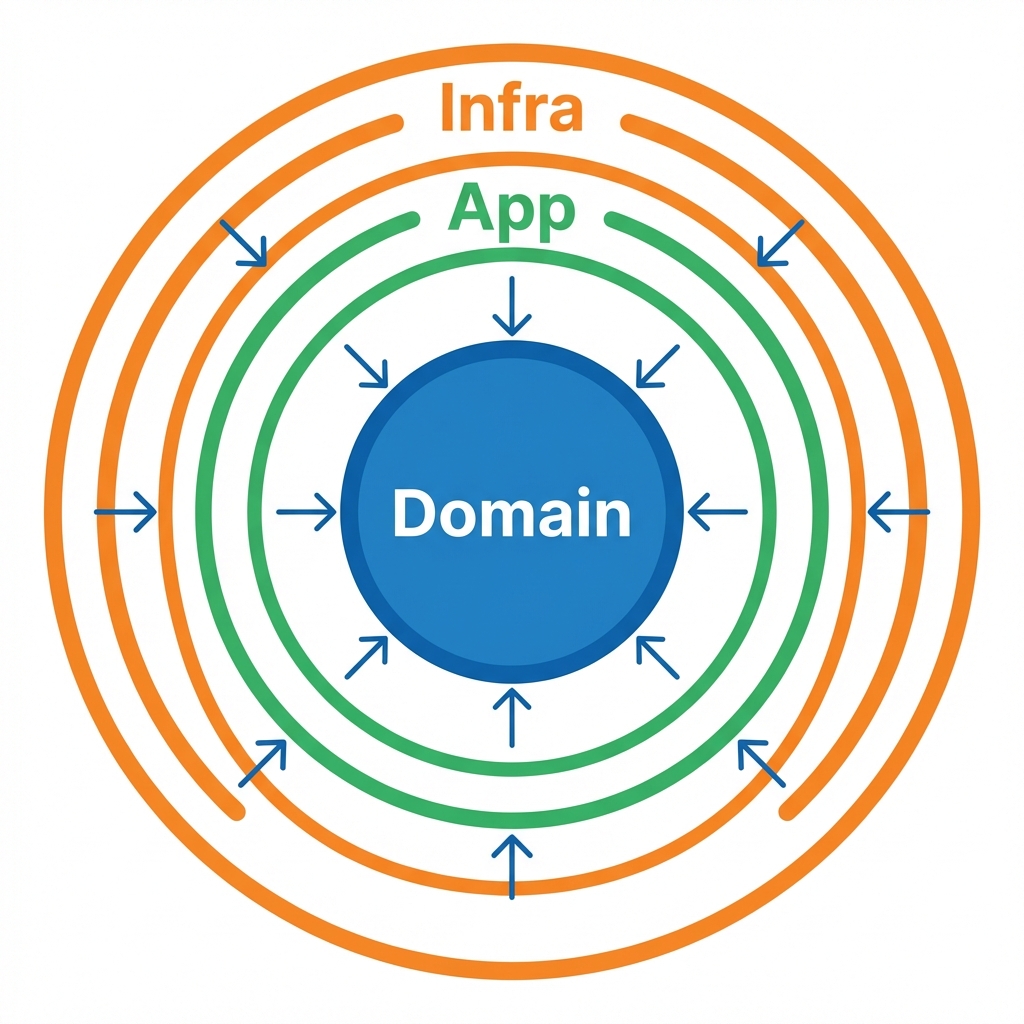
迷ったらこの3つでOKだよ〜😊
- domain:ルール(料金計算・割引適用・注文の整合性)🧠
- app:やりたいこと(注文する/支払う/通知する)🎬
- infra:外部(保存・メール・決済などの具体)🌍
依存の向き(超大事)➡️
domain ← app ← infra じゃなくて…
domain がいちばん偉いから、外部の都合を知らないのが理想👑✨
イメージ👇
- app は「保存して」「通知して」って お願いする(interface で)🙏
- infra が「はい、私がやります」って 実装する🛠️
5) フォルダ骨組み(最初はこれでOK)📁✨
src/
  domain/
    money.ts
    order.ts
    discount/
      discount-policy.ts
  app/
    ports/
      order-repository.ts
      notifier.ts
    place-order.ts
  infra/
    inmemory/
      inmemory-order-repository.ts
    console/
      console-notifier.ts
  main.ts
6) “差し替え口” を interface で作る🚪🧩(DIPの入口だよ💡)
ここがあるだけで、後から DB でも API でも差し替えできる🎉
app/ports/order-repository.ts 🗄️
export type OrderId = string;

export interface OrderRepository {
  save(order: { id: OrderId; totalYen: number }): Promise<void>;
  findById(id: OrderId): Promise<{ id: OrderId; totalYen: number } | null>;
}
app/ports/notifier.ts 🔔
export interface Notifier {
  notify(message: string): Promise<void>;
}
7) domain は「ルールだけ」置く🧠✨(外部は見ない!)
domain/money.ts 💴
export class Money {
  private constructor(private readonly yen: number) {}

  static yen(amount: number): Money {
    if (!Number.isInteger(amount) || amount < 0) throw new Error("Money must be a non-negative integer (yen).");
    return new Money(amount);
  }

  add(other: Money): Money {
    return Money.yen(this.yen + other.yen);
  }

  multiply(n: number): Money {
    if (!Number.isInteger(n) || n < 0) throw new Error("Multiplier must be a non-negative integer.");
    return Money.yen(this.yen * n);
  }

  value(): number {
    return this.yen;
  }
}
domain/discount/discount-policy.ts 🎟️
import { Money } from "../money";

export interface DiscountPolicy {
  apply(total: Money): Money;
}
domain/order.ts 📦
import { Money } from "./money";
import { DiscountPolicy } from "./discount/discount-policy";

export type OrderItem = { priceYen: number; quantity: number };

export class Order {
  constructor(
    public readonly id: string,
    private readonly items: OrderItem[],
  ) {
    if (items.length === 0) throw new Error("Order must have at least one item.");
  }

  total(policy: DiscountPolicy): Money {
    const raw = this.items
      .map(i => Money.yen(i.priceYen).multiply(i.quantity))
      .reduce((a, b) => a.add(b), Money.yen(0));

    return policy.apply(raw);
  }
}
8) app は「段取り」担当🎬✨(UseCase)
app/place-order.ts 🛒
import { Order } from "../domain/order";
import { DiscountPolicy } from "../domain/discount/discount-policy";
import { OrderRepository } from "./ports/order-repository";
import { Notifier } from "./ports/notifier";

export class PlaceOrder {
  constructor(
    private readonly repo: OrderRepository,
    private readonly notifier: Notifier,
    private readonly discount: DiscountPolicy,
  ) {}

  async execute(input: { orderId: string; items: { priceYen: number; quantity: number }[] }) {
    const order = new Order(input.orderId, input.items);

    const total = order.total(this.discount).value();

    await this.repo.save({ id: input.orderId, totalYen: total });
    await this.notifier.notify(`注文OK! orderId=${input.orderId}, total=${total}円 🎉`);
  }
}
9) infra は「具体担当」🛠️✨(まずは in-memory でOK)
infra/inmemory/inmemory-order-repository.ts 🧺
import { OrderRepository } from "../../app/ports/order-repository";

export class InMemoryOrderRepository implements OrderRepository {
  private store = new Map<string, { id: string; totalYen: number }>();

  async save(order: { id: string; totalYen: number }): Promise<void> {
    this.store.set(order.id, order);
  }

  async findById(id: string): Promise<{ id: string; totalYen: number } | null> {
    return this.store.get(id) ?? null;
  }
}
infra/console/console-notifier.ts 🖥️🔔
import { Notifier } from "../../app/ports/notifier";

export class ConsoleNotifier implements Notifier {
  async notify(message: string): Promise<void> {
    console.log(message);
  }
}
10) main.ts が “合体場所” 🧩✨(Composition Root)
ここだけは「全部知っててOK」な特別ゾーンだよ😎
main.ts 🧶
import { PlaceOrder } from "./app/place-order";
import { InMemoryOrderRepository } from "./infra/inmemory/inmemory-order-repository";
import { ConsoleNotifier } from "./infra/console/console-notifier";
import { DiscountPolicy } from "./domain/discount/discount-policy";
import { Money } from "./domain/money";

class NoDiscount implements DiscountPolicy {
  apply(total: Money): Money {
    return total;
  }
}

async function main() {
  const repo = new InMemoryOrderRepository();
  const notifier = new ConsoleNotifier();
  const discount = new NoDiscount();

  const placeOrder = new PlaceOrder(repo, notifier, discount);

  await placeOrder.execute({
    orderId: "order-001",
    items: [
      { priceYen: 480, quantity: 1 },
      { priceYen: 250, quantity: 2 },
    ],
  });
}

main().catch(e => {
  console.error(e);
  process.exitCode = 1;
});
11) AI の使い方(この章向け)🤖📝✨
使うと強い場面ベスト3🏆
- ① ユーザーストーリーを整える📝
- ② 変更点リストを増やす🔮
- ③ interface 名・責務の相談(SRPの助け)✂️
そのまま使えるプロンプト例💬
- 「この仕様をユーザーストーリーにして。受け入れ条件も3つずつお願い😊」
- 「Campus Café 注文アプリで、将来増えそうな変更点を20個出して。分類もして🙏」
- 「この class の責務が多い気がする。分割案とファイル構成を提案して🧩」
12) (おまけ)“プロジェクト専用の指示書” を置くと更に楽🤖📚
VS Code の最近のリリースで、Copilot に Agent Skills を読ませる仕組みが入ってきてるよ(実験的)🧪
.github/skills に SKILL.md を置くと、必要に応じてチャットの文脈にロードされる感じ✨ (Visual Studio Code)
たとえば SKILL.md に「domain は外部 import 禁止」「app は ports 経由」みたいなルールを書いておくと、AIが脱線しにくくなるよ〜🧠🧷
13) ミニ課題🎁(提出物)
今日の提出はこれだよ〜📮✨
- ✅ ユーザーストーリー 5本(各:受け入れ条件3つ)
- ✅ 変更点リスト 15個(割引/支払い/通知/保存 などに分類)
- ✅ フォルダ骨組み作成 + interface(Repository/Notifier)
- ✅
main.tsで1回だけ動く(ログが出たらOK🎉)
14) チェックリスト✅✨(できてたら合格!)
- domain が infra を import してない🧼
- app は ports(interface)に依存してる🧩
- infra は interface を実装してる🛠️
- main.ts に “合体” が寄ってる🧶
- 変更点リストがある(未来の拡張ポイントが見えてる)🔮
次の第27章は、この土台に 割引追加🎟️/支払い追加💳/通知追加🔔 を入れて、SOLID を “当てながら伸ばす” 実戦パートだよ〜🔥🧸